Convert continuous independent lines to polylines
Learn how to convert individual connected line segments into polylines in CAXA Draft (or IRONCAD Draft), including lines imported from DXF or DWG files created in other CAD applications.
When working with individual line segments, only the selected segment is selected, even if it is connected to other segments.
Procedure
[1] Click the [Common] tab → [Modify] group → [Polyline Edit].
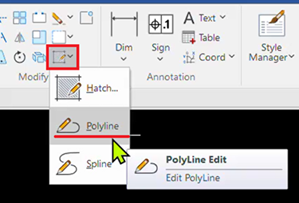
[2] Select [Joind] from the prompt menu at the bottom of the screen.
[3] Select all the line segments you want to convert into polylines.

You can also select multiple line segments by dragging a selection window diagonally.
[4] Right-click to confirm the selection.
The selected connected line segments are merged into polylines, with their endpoints joined together.