icVault - Switch display language (Japanese ⇔ English)
Switching from Japanese to English
[1] Click the [設定] command. ※ 設定 = Settings
[2] Select [English] from the Language drop-down menu.
[3] Click [Apply OK] to apply the settings and close the Settings dialog box.
[4] Open the [Add-Ins] tab > [Add-In Applications], clear the [icVault] check box, and click [OK].
※This temporarily disables icVault.
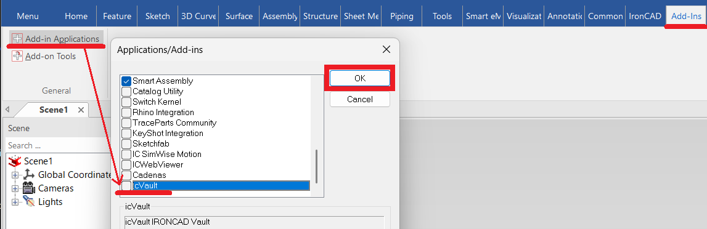
※This temporarily disables icVault.
[5] Close all running instances of IRONCAD, and then restart IRONCAD.
[6] Open the [Add-Ins] tab > [Add-In Applications], select the [icVault] check box, and click [OK].
※This enables icVault again.
※This enables icVault again.
The icVault commands are now displayed in English.
※To switch from English to Japanese, follow the same procedure and select [Japanese] from the Language drop-down menu.