Adjusting Camera Settings in KeyShot
This section explains how to adjust camera settings in KeyShot.
Adjusting the Camera
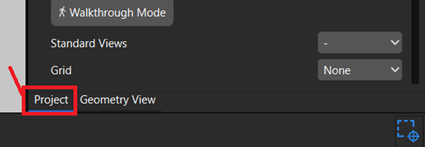
[1] Open the [Camera] tab in the Project window.
The camera configured by default in the selected environment is displayed in the camera list.
The camera configured by default in the selected environment is displayed in the camera list.
[2] Click [Geometry View] on the ribbon.
The current camera position and orientation are displayed visually on the right side of the screen.
The current camera position and orientation are displayed visually on the right side of the screen.
[3] Drag the Project window to a convenient position so that you can easily view both the camera settings and the Geometry View.
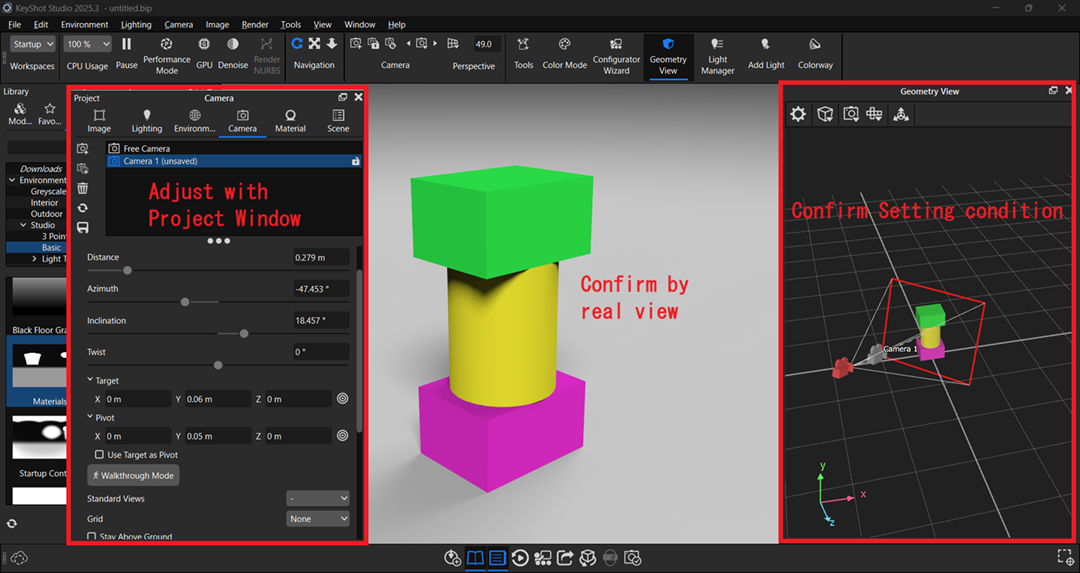
[4] Adjust the [Position and Orientation] settings.
Adjust the camera position and orientation while checking the Geometry View and the appearance of the model.
Adjust the camera position and orientation while checking the Geometry View and the appearance of the model.
The following settings are available:
- Distance: Adjusts the distance between the camera and its target, making the model appear larger or smaller.
- Azimuth: Rotates the camera horizontally around the target.
- Inclination: Rotates the camera vertically around the target.
- Twist: Rotates the camera around its viewing axis, tilting the view clockwise or counterclockwise.
- Target: Specifies the point the camera is aimed at.
- Pivot: Specifies the center of rotation when adjusting the camera view.
[5] Adjust the [Lens Settings].
- Perspective: Simulates a real camera. Objects appear smaller as their distance from the camera increases, creating a natural sense of depth.
- Orthographic: Displays objects without perspective distortion. Object size does not change with distance, and parallel lines remain parallel.
- Shift: Allows you to correct perspective distortion, such as converging vertical lines, while maintaining a perspective view.
- Panoramic: Captures a 360° view around the camera, suitable for panoramic viewers and VR applications.
Add a Camera
Click [Add New Camera] in the [Camera] tab of the Project window.
A new camera, such as [Camera 1], will be added to the camera list.
A new camera, such as [Camera 1], will be added to the camera list.
Refer to the Adjusting the Camera section above to configure the new camera.