Adjust/Add Pin (Light Settings)
When you apply a [Studio] environment, it may contain lighting pins.
This section explains how to adjust the lighting in KeyShot.
This section explains how to adjust the lighting in KeyShot.
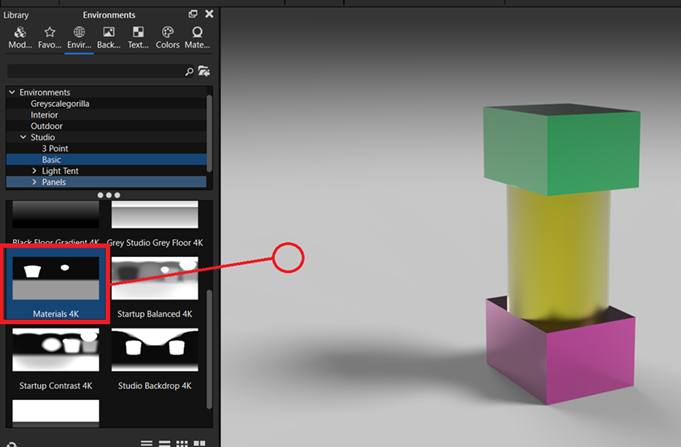
Example: Studio → Basic → Materials 4K
By adjusting the lighting pins in the applied Studio environment, you can control how light falls on the model and improve its appearance.
Procedure
[1] Open the [Environment] tab in the Library window, and drag and drop a Studio environment onto the background in the center of the screen.
[2] Open the [Environment] tab in the Project window and click [HDRI Editor].
[3] The lighting Pins are the elements highlighted in red in the image.
You can adjust their position, color, shape, falloff, and other properties.
Adjusting these settings changes how light falls on the model, allowing you to control its appearance.
You can adjust their position, color, shape, falloff, and other properties.
Adjusting these settings changes how light falls on the model, allowing you to control its appearance.
[4] Select the pin you want to adjust from the HDRI image or the pin list.
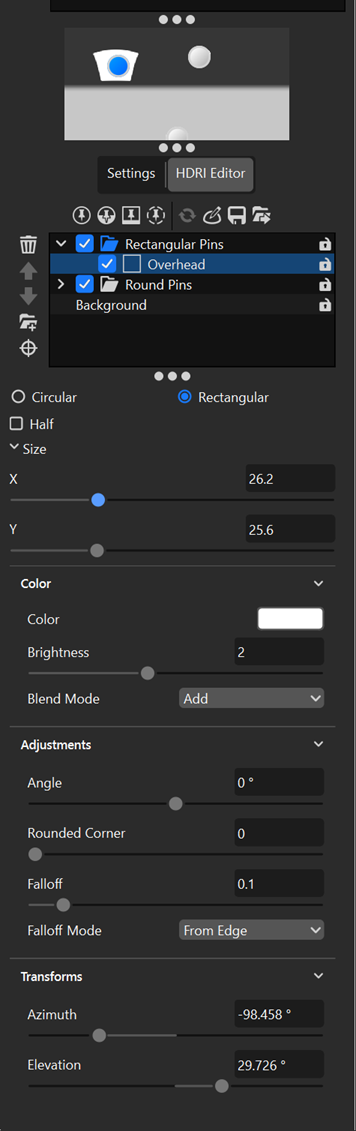

Adjust the following settings while checking the appearance of the model in the real-time view.
- Circular / Rectangular: Select the shape of the lighting pin. Enable [Half] to use only the upper half of the shape.
- Size: Adjust the size of the lighting pin.
- Color: Change the color of the lighting pin. You can use lighting colors other than white. Note that this setting changes the color of the light, not the material color of the part.
- Blend Mode: Select from Add, Blend, Alpha, or Screen.
Add: Adds the pin's light to the existing environment, producing a stronger lighting effect.
Blend: Blends the pin with the existing environment, producing a softer lighting effect.
Alpha: Combines the pin with the existing environment based on its alpha values.
Screen: Combines the pin with the existing environment to produce a brighter result. - Falloff: Adjust how the brightness of the pin decreases from its center toward its edges.
- Falloff mode: Select how the pin's brightness falls off and how the falloff is calculated.
- Transforms: Adjust the horizontal and vertical position of the pin.