Create characters in 3D sketches

Create characters in 3D sketches

This section explains how to create arbitrary text in 3D Text.

[1] Create Sketch : 2D Shape.


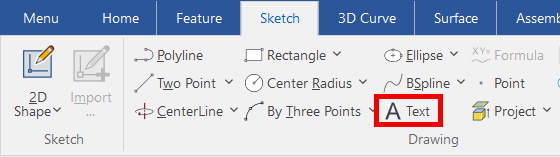
[2] Click [Text] command in the [Sketch] tab. 
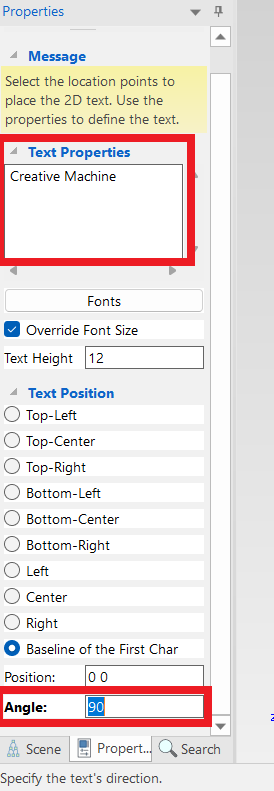
[3] Enter [Text Properties] and [Angle].
[4] Click [OK].


Please refer to the video below.

IC-077
    • Related Articles

    • Set Insert Joint Point and create continuous pipes and mounts

      This section explains how to use the [Attachment Point] function to build continuous pipe structures or equipment base frames in IRONCAD. In piping design and equipment base structures, it is common to use multiple sections of the same type of round ...
    • Create a twisted shape

      This section explains how to create a twisted shape using [Loft] in the [Feature] tab. Procedure: [1] Create Sketch. then copy at the "TriBall". And set position each sketch. [2] Click [Loft] in the [Feature] tab. [3] Select all sketches. [4] Click ...
    • Creating a Block (CAXA Draft)

      This section explains how to create Block parts in CAXA Draft. Block parts allow you to register frequently used lines or shapes as blocks so that they can be easily inserted into drawings. By registering items such as bolts, pins, and annotations as ...
    • Create sheet metal shapes with loft

      This section explains how to use the Loft function for sheet metal. Procedure: [1] Create two sketches for loft. [2] Click [Create Loft] in the [Sheet Metal] tab. [3] Select two sketches. [4] Change stock as needed. Click [Change Stock]. [5] Click ...
    • Create Movement Using [Walk] Feature

      This section explains how to create a movement that simulates walk a building from the camera's point of view. Two cameras are required: the main camera and a viewpoint camera (walkthrough camera). When executing the animation, make sure the ...