Creating a Groove on a Cylindrical Surface Using Sweep
This section explains how to create a groove for a cam on a cylindrical shape.
The groove is created in a direction perpendicular to the center axis of the cylinder.
Procedure:
[1] Draw a 2D sketch to use as a guide curve for the cylindrical surface.
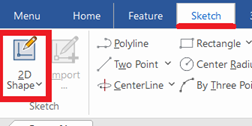
Click [2D Shape] in the [Sketch] tab.
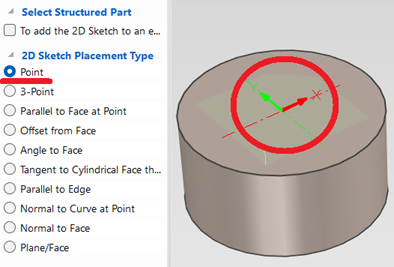
Select "Point" and click center point of cylinder. Then Click [OK].
[2] Go to the [Features] tab and click [Wrap Curve].
Select "Point" and click center point of cylinder. Then Click [OK].
[2] Go to the [Features] tab and click [Wrap Curve].
[3] Create a cross-sectional shape of the groove.
[4] Select the guide curve and the profile created in Steps [1] and [3,] and configure the sweep properties.
[5] Click [OK].
 If an error occurs, try changing the modeling kernel to [Parasolid] and check again.
Please refer to the video below.
IC-124